
It’s very well known that Performance Max campaigns don’t give us much room to optimise.
Google introduced this campaign type in 2021 and has pushed it harder each year. With AI Overviews and automated results taking more SERP space, reaching users across multiple placements matters more than ever.
Businesses running Performance Max without proper Google Ads management often misinterpret performance because the campaign hides where problems actually come from.
Because of that, we approach it as a diagnosis rather than tweaking settings randomly. There’s a specific order we follow to find where the breakdown actually begins.
But before anything…
Performance Max (PMax) is a goal-based campaign type that allows Google to run ads across all its inventory using automation:
Instead of choosing keywords and placements manually, you give Google:
audiences + creatives + signals
Then Google decides who sees the ads and where.
Important note
This article focuses on lead generation / B2B businesses.
If you run eCommerce, a lot of this still applies but the priorities are different. I’ll cover that separately.
Also this is not a beginner tutorial.
I’m assuming you already:
We’re now fixing performance.
When PMax underperforms, the mistake is usually fixing the wrong thing first.
We troubleshoot from traffic quality to conversion, not the other way around.
At this stage we’re fixing who Google is learning from.
For years PMax didn’t allow proper negatives. Now it does, and honestly this is the single biggest improvement Google has made to this campaign type.
Why it matters
PMax triggers thousands of searches.
Many of them are completely irrelevant.
If you don’t block them, Google will happily spend your budget learning from the wrong users.
The goal here is simple:
Force the algorithm to learn only from searches that could actually become clients.
Step-by-step
Go to: Insights & Reports → Search Terms
Export or review the list and identify:
Quick trick: reviewing every single search term could take you ages. A shortcut is to filter the terms by cost and negate those that are burning your budget and aren’t relevant to your business.
Then upload your negative keyword list. After doing this, you’ll normally see CTR increase, CPC stabilise, and lead quality improve.
Not instantly, but very consistently.
Now we check whether people instantly recognise the ad applies to them.
Google recently released channel performance reporting inside PMax and it’s a big opportunity.
We still can’t exclude placements individually, but now we can at least understand where performance is weak.
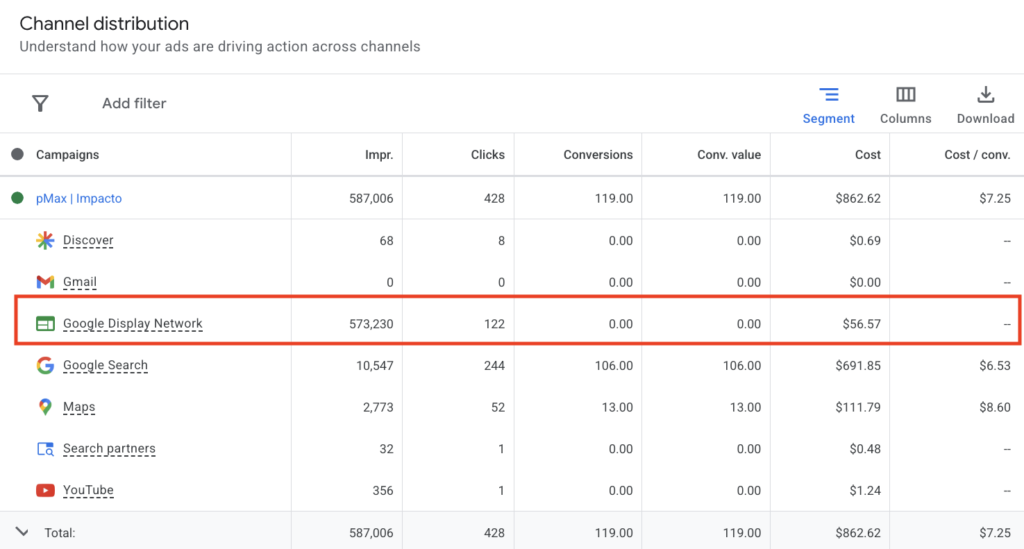
In this example the campaign generated 573k impressions during the selected period and only 122 clicks. That’s a 0.02% CTR.
Huge opportunity.
So how do you increase Display clicks?
Improve your images. This is how Display ads look like:

Lets be honest, most B2B banners are boring – they suck.
You can instead:
Here is an example of an ad that has helped us improved CTR for one of our clients:

Low CTR in PMax is normal, but it’s not impossible to improve. Google shows ads across a lot of unrelated content, so you should guide it.
Go to:
Tools → Content suitability
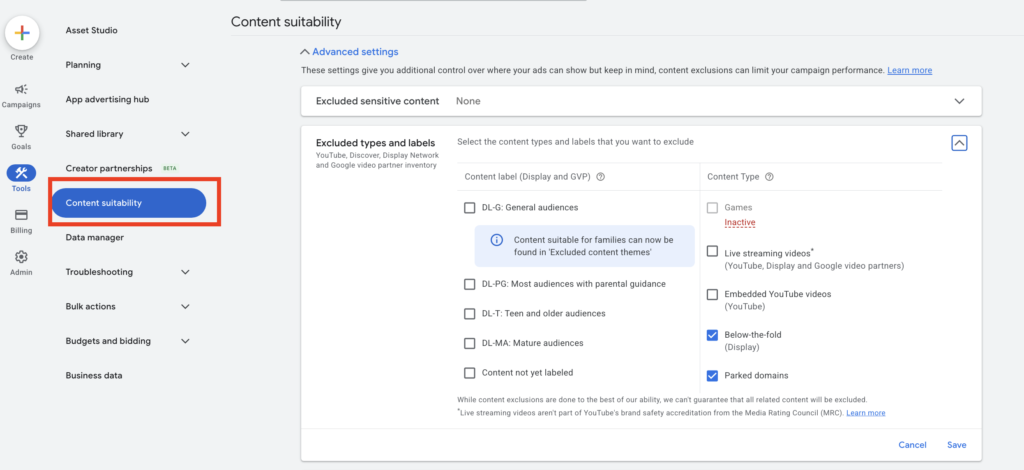
Ask yourself:
“Would someone interested in my service realistically consume content about this?”
If not, exclude it.
This part is always a bit confusing, so I always ask ChatGPT for help with it.
This quietly improves traffic quality a lot.
Next we confirm the message matches the intent behind the search.
Let’s use the same example again, but focusing now on Search:
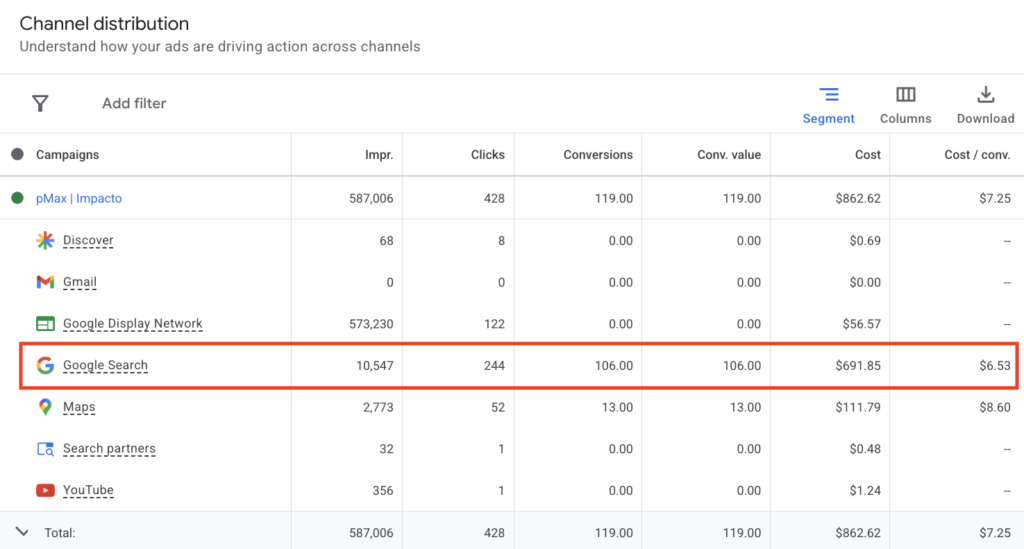
This campaign generated 10.5K impressions and 244 clicks.
2.32% CTR.
Low CTR in PMax Search is common, but it shouldn’t be accepted as the baseline.
Not bidding
Not budget
Messaging
Most advertisers write about themselves.
Users search problems.
Bad:
Professional electrical services
Better:
Power tripping every night?
Good:
Need an electrician today?
Include:
Questions
Urgency
Outcomes
Specific situations
Also, the negatives from step 1 will help CTR because irrelevant impressions stop triggering.
Objective: Aim for 5%+ CTR on Search segments.
Finally we verify the page actually convinces visitors to take action.
So now traffic improved and clicks increased.
But conversions didn’t.
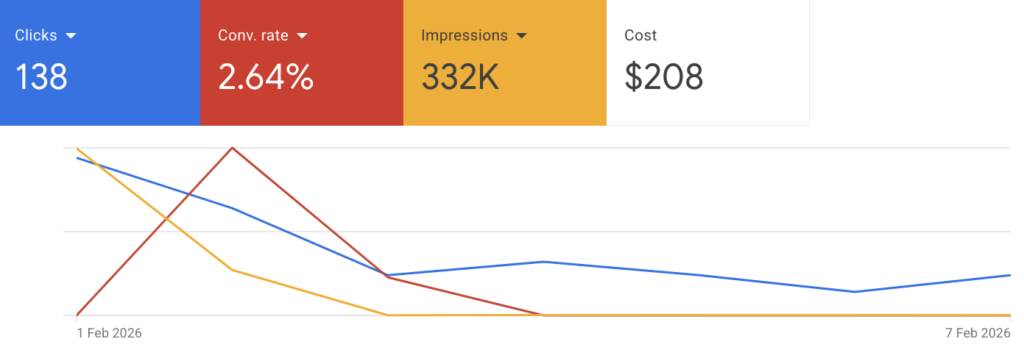
At this point the problem usually isn’t Google Ads anymore.
It’s your website.
Users arrive with intent but the page doesn’t help them take action.
Common issues:
Unclear offer
Weak CTA
No trust signals
Too generic
Answers the wrong questions
You need CRO, not more targeting tweaks.
Work on:
Clear structure
Better messaging
FAQs matching real objections
Proof and credibility
You can use tools like Microsoft Clarity to watch recordings and heatmaps to understand behaviour.
Or outsource CRO if you want faster results, because this becomes UX work, not ads work.
Performance Max problems appear in sequence:
traffic quality → recognition → intent match → conversion
Most accounts try to fix conversion first.
PMax improves when fixed in this order.
Feed the campaign the right signals and performance stabilises.
Kia ora, we’re Impacto. Contact us now to help you grow your business.
